Showing posts with label Apple. Show all posts

Nov 16, 2010

My MBP Desktop


just remove the geek tool stuffs and just make it looks simple

"Simplicity is the ultimate sophistication" - Leonardo da Vinci
Sep 9, 2010

New Exploit Could Bring Jailbreak for iOS 4.1

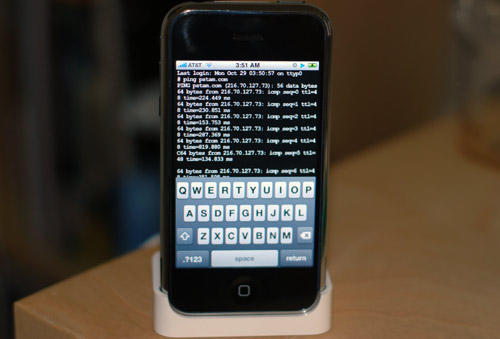
A new exploit credited to @pod2g could bring about a jailbreak for iOS 4.1, according to a series of tweets from MuscleNerd.
Earlier today @pod2g tweeted the following decryption keys:
iPhone 4G iBSS 4.0.1: iv=91f94e5d726a2d2f2c7ffad58d4f3b77 key=d05c3c40db40e738926f811b8b1314038d26096c4102461698a49098c47a3fe6

MuscleNerd then tweets:

congrats to @pod2g for the latest exploit and also @p0sixninja who have been trying for months.

Crazy timing that @pod2g got latest exploit just as 4.1 went public (lots of work left...keep away from 4.1 for now!)

We'll keep you up to date on the situation as we learn more. Please remember not to upgrade to iOS 4.1.

Update:
Good news from @pod2g :)

Works on 4.1 (!) iBSS iv=c2c5416472e5a0d6f0a25a123d5a2b1c key=1fbc7dcafaec21a150a51eb0eb99367550e24a077b128831b28c065e61f894a0

Update x2:
Exploit is confirmed working for the iPod Touch 4G as well. A source has told BGR that in order to patch this particular bootrom hack Apple would need "a whole new processor rev." A re-flashed or patched bootrom for the current hardware would not be sufficient.

iclarified.com

Sep 7, 2010

iOS 4.1 on Sept 9th, 4.2 in November

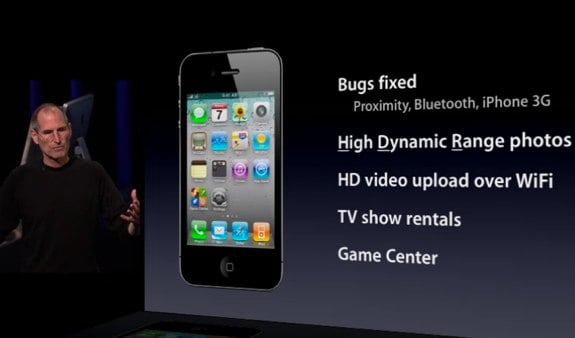
iOS 4.1 was, as expected, announced during today’s annual September keynote, and includes a slew of bug fixes, and a few new features.

iOS 4.1 includes bug fixes for proximity awareness, Bluetooth, and performance on the iPhone 3G. The iPhone will now be able to take High Dynamic Range photos, upload HD video over Wi-Fi, and rent television shows on the go. Also making its debut is the Game Center, which is all about social gaming on iOS devices.

Using High Dynamic Range (HDR), the iPhone takes three photos: one at normal exposure, one under exposed, and one over exposed. iOS 4 then combines the three photos using “advanced algorithms” to create a single high-definition photograph. Both the normal exposure picture and the HDR picture are kept in the photos app on the iPhone, making it easy to choose one or the other. The demos look amazing; the HDR photos bring out features in the background that you couldn’t see in the normal exposure.

The Game Center will be a very interesting addition to iOS. There will be both features built into the operating system, and a standalone app. You’ll be able to play interactively with friends, or be auto-matched with other players. You’ll be able to compare scores, and see what your friends have been up to. Game Center brings natively to iOS what several developers have been doing on their own.


Also announced to be coming out this November is iOS 4.2. iOS 4.2 will bring all of the features of iOS 4.1, finally, to the iPad, and presumably unify the platform. The biggest addition to the iPad looks like it will be wireless printing. Being able to print directly from Pages or Mail will be a huge benefit to people who still need to be able to show things on paper.

Multitasking looks slick on the iPad as well, smooth animation, and super fast switching between apps. When Steve Jobs demoed opening a link in Mail and switching to Safari, the transition happened so fast it made me wonder about the apps that have built-in browsers. Will apps still need built-in browsers if switching to Safari is that fast?

Overall both updates look solid, and while I’m happy to be getting 4.1 on my iPod touch, I’m really looking forward to 4.2 on the iPad.

theappleblog.com

New iPod Nano, iTouch, iPod Shuffle, Apple TV


Aug 26, 2010

Winning moves

Jailbreakme v2.0 was a great success, and it’s provided a nice leveling point for all jailbreakers and unlockers on all devices at firmware versions less than 4.0.2/3.2.2. We hope that everybody ever interested in jailbreaks or unlocks was able to join in on the jailbreakme bonanza. Those of you who had Cydia capture your SHSH blobs, or those of you who captured them locally, will always be able to benefit from the jailbreakme.com v2.0 release. Congratulations!

Now it’s a few weeks later, and Apple has closed the jailbreakme.com hole. They’re shipping devices with FW 4.0.2/3.2.2, impervious to this particular jailbreak. So now, people will begin to ask: will there be a jailbreak for devices that shipped with 4.0.2/3.2.2, out of the box?

No, there won’t be. FW 4.0.2/3.2.2 was *only* released to fix the jailbreakme hole. With FW 4.1 still in its beta stages, it makes no sense to escalate the “cat & mouse” with Apple for FW updates that only fix the jailbreak holes. To quote WOPR, “the only winning move is not to play”.

If the cat & mouse game escalates too quickly, especially during beta FW periods, nobody but Apple benefits. For this reason, there won’t be a 4.0.2/3.2.2 jailbreak specifically during the period where 4.0.2/3.2.2 is the latest public release. At best, some future 4.1x FW jailbreak *may* be compatible with 4.0.2/3.2.2 (but don’t count on that).

If any of this is confusing, please ask below in our comments section!

P.S.: For those of you with iPhone3G or iPod Touch 2G(not MC version), it’s true you can always use redsn0w to jailbreak your 4.x devices. Don’t let that dilute the above message, though :)

http://blog.iphone-dev.org/

Aug 2, 2010

New jailbreak tool for all iDevice

jailbreakme.com is back!

Thanks to some serious work by @comex, you can now jailbreak your iPhone, iPod Touch, or iPad right from MobileSafari — no PC or Mac needed!

Just visit http://jailbreakme.com on your device.

Note: There are currently some issues involving MMS and Facetime being disabled, and those are being worked on. Feel free to discuss problems and/or solutions in the comments beow.

For those needing a carrier unlock, use the existing ultrasn0w in Cydia on your iPhone3G or iPhone3GS. After a short testing period, we’ll push out the iPhone4 version.


Jul 27, 2010

Now Legal to Jailbreak Your iPhone in the U.S.

Feel like jailbreaking your Apple iOS device? Fearful that Apple will set the law on you if you do? Fear not, because a decision just rendered by the U.S. Copyright Office now allows you to legally jailbreak your device for a number of purposes. The alterations to the Digital Media Copyright Act (DMCA) are huge news for both Apple and Apple users alike.

Not only is jailbreaking now okay, but ripping DVDs and cracking video game or software encryption is too, in certain special circumstances. It doesn’t exactly mean it’s open season for any and all piracy, but it does relax things quite a bit, and will probably make it much harder to prosecute those kinds of violations.

The new rules designate six classes of work that are now exempt from prosecution under the DMCA. Here’s the categories, briefly explained:

1. Movies on DVD, when used for educational, non-commercial purposes. Bypassing encryption on said videos is now legal. NewTeeVee has more on this portion of the rule changes.
2. Applications that allow for the use of legally obtained software on platforms that otherwise wouldn’t allow it. For instance, jailbreaking iOS so you can run Backgrounder or Wi-Fi Sync.
3. Applications that allow for the use of cellular devices on networks for which they weren’t originally designed. Case in point, unlocking an iPhone so that you can use it on Sprint instead of AT&T.
4. Video games can be cracked when the reason behind it is to promote, investigate or test for security of a computer, computer system or network.
5. Hardware-dongle protected software for which the dongle is no longer available or is obsolete, rendering the software otherwise unusable.
6. Enabling text-to-speech in ebooks which contain methods to prevent those read-aloud features, since, presumably this limits access by those with disabilities, though that isn’t specific stated in the rule itself.

Now, as you might have guessed, that doesn’t mean there aren’t any consequences for jailbreaking. Apple is still well within its rights to void your warranty, or even to suspend your Apple Store account if it manages to discover that you’re using jailbreak software. But not having to fear the long arm of the law is yet another argument in favor of jailbreaking still being worth it.

I’ve been leaning heavily towards jailbreaking my iPad, mainly because Apple seems not to be in a hurry to get iOS 4 on the device. This ruling pretty much cinches it for me, though I think I’ll do some more research about the effect it has on battery life before I commit. Anyone else motivated to jailbreak because of this news, or was the threat of legal action never much of a scare tactic to begin with?

theappleblog.com

Jul 15, 2010

Apple Releases iOS 4.1 Beta to Developers

Apple has announced to developers that iOS SDK and iOS 4.1 beta are now available from the iPhone Dev Center.

Apps built with iOS SDK 4.1 beta should only be tested on devices running iOS 4.1. Make sure to read the Xcode 3.2.4 Readme and the iOS SDK 4.1 beta Release Notes before installing and downloading these new releases.

The SDK build number is 10M2304 and the firmware build number is 8B5080c.

Hopefully some of the false reception readings and proximity sensor issues will be resolved in this update. Developers please let us know your experiences in the comments...

Changes:
1. Signal Bars seem to be fixed and are taller
2. New Baseband (02.07.01)
3. Game Center is back with new look (see screenshot)
4. Camera Switch and Flash buttons reposition in landscape mode (see screenshot)
5. You can now choose to add Favorite as voice or FaceTime.
6. Spell Check can be turned off in Settings

Jul 14, 2010

Planetbeing Demos iPhone 4 Unlock

Why Apple—and not its customers—should fix the iPhone 4

In our reporting and a video yesterday, we made the point that the signal drop that iPhone 4 customers have observed when they hold their phones the "wrong" way is real—and we've called on Apple to do something about it. In an earlier statement, the company noted that attenuated performance is a "fact of life" for every wireless phone. Apple suggested owners mitigate the problem by holding the phone differently or purchasing a case. But those solutions put the onus on consumers and skirt Apple's obligation to offer a product that works consistently and reliably out of the box.

We think it's the company's responsibility to provide the fix—at no extra cost to consumers.

Our tests, conducted in our labs using controlled signals, confirm growing anecdotal indications that the iPhone 4's problems are anything but illusory. Our tests found that when your finger or hand touches a spot on the phone's lower left side—an easy thing to do—the signal can significantly degrade enough to cause you to lose your connection altogether if you're in an area with a weak signal. We tested several other AT&T phones the same way, including the iPhone 3G S and the Palm Pre. None of those phones had the significant signal-loss problems of the iPhone 4.

Ironically, aside from these reception glitches, our other tests placed the iPhone 4 atop the latest Ratings of smart phones. But we did not feel comfortable listing a phone with such a problem as "recommended," and therefore have withheld that tag.

Our stopgap fix for the issues of applying duct tape to the phone—while inexpensive and easily done—obviously isn't meant to be a permanent solution. The real fix, we believe, should come from Apple. The company has said it will issue a software update that will make the phone's bars more accurate, though it remains to be seen if fixing metering inaccuracies will address the problem of dropped calls. The company will also provide a full refund to users who return their iPhone within 30 days.

But for those who prefer to keep their iPhone, we encourage Apple to step forward soon with a remedy that fixes the confirmed antenna issue, and not one that requires additional consumer expense.

source

Jul 11, 2010

The Smartest People in Tech


CEO, Apple

When Steve Jobs returned to Apple in 1997 after a 12-year exile, the company was close to bankruptcy. Thirteen years later it has a market cap of $250 billion and is the world's most valuable tech company, transforming whole industries along the way. iTunes reinvented music. Pixar, now part of Disney, elevated animated films. The iPhone changed telecom. And the new iPad has other computer makers scrambling to respond. Rocking one industry could be luck, but upending four? That's smart.

He is a visionary, a micromanager, and a showman who creates such anticipation around new products that their releases are veritable holidays. And Jobs is a pop culture icon like no other business executive: An episode of The Simpsons a few years ago featured a Jobs-like character named Steve Mobs.

His dictator-like control can cause havoc for partners: Jobs, 55, has decided, for example, that Apple products won't support Adobe Flash, the code most video-heavy websites depend on, leading designers to switch to new tools. But Jobs' vision is also what gives these devices their elegance, causing consumers' hearts to flutter. --Jessi Hempel

Geohot Jailbreaks the iPhone 4 ( not anymore )

Geohot has announced that he has jailbroken the iPhone 4.

As far as a release goes, it probably won't happen from me. limera1n is little more than a raindrop on a website; it was never mentioned by me previous to this post. pwned4life is a complete invention of some blogger in a basement somewhere. When I said pwned for life, I was referring to the original iPhone, 3G, and Touch; which of course are, by the aptly named PwnageTool. Again, please don't ask for release dates. Every person that does makes me want to release a little bit less.

Considering that there already is a userland jailbreak coming for all 4.0 devices; Geohot may save his exploit for the future.

Update 1 :
Geohot Withdraws from iPhone Jailbreak and Unlock Scene

Geohot has also now shut down his Twitter account which has 113,761 followers. Visiting the account now says, "This person has protected their tweets" and no past tweets are viewable to the public.

Here are his last messages:

"I was just having fun but some people had to take this all way too seriously. it's just a phone, and it isn't much fun anymore.

my bio isn't "iPhone hacker" it was just something i did occasionally when i was bored. seriously, i think many of you care way more than me

it was a cool ride, and i've learned a lot about a lot. perhaps one of these days i'll do a more formal goodbye."

Jul 7, 2010

Understanding iOS 4 Backgrounding and Delegate Messaging

The World Before Multitasking

The first thing that I learned from this is that applicationDidBecomeActive: is being called right after application:didFinishLaunchingWithOptions:. So even before 4.0 it would have been smart to put there any kind of code that you want executed whenever the app becomes active, be it after app start or upon rejecting a phone call.

Not shown on this diagram is the situation that your app is eating up all the system memory and ignores both the level 1 and level 2 memory warnings. In that case the OS will also terminate your app without totally unscrupulous.

The mechanism with WillResignActive and DidBecomeActive is sort of the Backgrounding Lite that has always been there. This occurs whenever some other thing is displayed in front of your app. This could be the UI to accept a phone call or something as benign as the synching screen.

Multitasking ON

Adding multitasking to this flow chart makes it about twice as complex. I probably spent an hour trying to fit it all together with no crossing lines. Another thing that I noticed while doing this is that applicationWillResignActive: is the only delegate method that I could not optimize into a single box, because one use is to show that the app has been interrupted, the other is to the path into the background.


An app built with 3.2 will still go through a short background stage where applicationDidEnterBackground: is called. but then it will be terminated as usual. If the same app is built against a 4.x SDK then it will not go straight from background to being terminated. Instead it will stick around and so will be the debugger. As soon as you tap the app icon again or choose it from the app switcher it is first informed that applicationWillEnterForeground and then applicationDidBecomeActive.

An app that is suspended but still in RAM might be terminated by the OS if memory runs low. But after entering the background there is no longer any delegate method being called, instead the app will receive a KILL signal. This occurs also if the user long-presses the app icon in app switcher and then removes the app from there with the removal button.

Accepting a phone call no longer terminates your app but will send it into the appropriate background mode. Within the background box you see two purple states that the app can be in. All apps are suspended in RAM per default. You might want to slim down your memory footprint to make your app a less likely target for killing if the system runs low on memory.

Only apps that actually require background processing continue to be executing. This requirement is either set in info.plist or by telling the OS that you have a task to complete, like for example a file upload.

The following kinds of activities get to run in true multi tasking behind the foreground app with lesser CPU priority.

  • playing music: “App plays audio”
  • geo location: “App registers for location updates”
  • VOIP: “App provides Voice over IP services”

If your app does one of these things then adding the key to info.plist is all it takes. But be aware that as soon as your app stops doing what it stated it would be doing the OS again will send it to sleep, only to be awakend by another gentle tap by the user.

In background mode you’re advised to stop updating the UI. Especially with OpenGL Apple is really strict. If you app as much as touches OpenGL while in background the app gets killed right away.

There are only two scenarios left where your app’s applicationWillTerminate: will actually be called: if it’s build with an SDK of less than version 4.0 or if you chose to opt out of backgrounding by adding the UIApplicationExitsOnSuspend key to your info.plist.

So, let’s ask the question we’ve been doing all this fuss for: Where should you now put your code to initialize, update or save changes? applicationWillTerminate not being called in the majority of cases makes it a rather bad candidate to save user defaults or data.

Looking at the chart I see applicationDidEnterBackground as the ideal candidate delegate method for saving state. This is also the last method to be called before a regular 4.0 app gets put to sleep and before a possible kill.

For updating data from the web the case is not as clear. You would not want to reload every time the user comes back to your app. Possible applicationDidBecomeActive: is a good place, provided that you only reload data if sufficient time has passed to be able to assume that something new is available.

Only the first loading of data can stay in application:didFinishLaunchingWithOptions: since every call applicationDidBecomeActive: most likely has the data already loaded previously.

Conclusion

Adding fast app switching and multitasking support is quite easy since for the most part you don’t need to do anything. But you WILL have to review the contents of your app delegate methods to see which code has to be moved into one of the other delegate methods now. Clean out applicationWillTerminate: and have a close look at application:didFinishLaunchingWithOptions: to check if you have something in there that needs to be done every time the app becomes active.

These charts come from some experimentation that I did and what I remembered from the WWDC 2010 session videos on multitasking. Potentially there are mistakes or more surprises hidden in there. Please let me know if you find any.

Here’s the chart in PDF format in case you want to print it out and frame it.
source

Jun 18, 2010

iPhone 4 Confirmed to Have 512MB of RAM (Twice the iPad and 3GS)

Since the launch of the original iPhone, Apple has made efforts to hide some of the actual tech specs of the device from consumers. Apple has never advertised or even published the processor speed or amount of RAM found in the iPhone. Arguably, Apple is trying to shield customers from these technical distractions and instead trying to focus on overall functionality.

More technically inclined customers, however, still love to know what they have to work with. The original iPhone and iPhone 3G contained 128MB of RAM, while the iPhone 3GS was boosted to 256MB of RAM. Similarly, the iPad contains 256MB of RAM. This discrepancy offers a technical explanation why Apple is not supporting iOS 4 features such as multi-tasking on the original and 3G iPhone -- there simply isn't enough RAM.

We have since heard that the upcoming iPhone 4's RAM has again been upgraded. This will bring it to a total of 512MB of RAM, twice as much as the 3GS and iPad. This number actually contradicts tear down photos of a prototype iPhone 4 that was leaked to the internet. An analysis of that prototype device showed it only carried 256MB of RAM. The 512MB figure, however, does agree with a Digitimes report from May 17th that confirmed a 960x640 screen resolution, thinner display, and indeed 512MB of RAM. We had heard that Apple confirmed this 512MB figure during one of the WWDC sessions last week, and have now verified this. The session it was revealed in is now available (Session 147, Advanced Performance Optimization on iPhone OS, pt 2) for registered Apple developers.

The added RAM should help overall performance and multi-tasking on the new iPhone 4. It could also explain why the iMovie App that Apple introduced at WWDC will only run on the iPhone 4. Apple has said iMovie will only run on the iPhone 4 and not the 3GS or even the iPad. It seems conceivable that it actually makes use of the extra RAM offered by the iPhone 4.

macrumors.com

Jun 8, 2010

iPhone 4


Apple today official unveiled the iPhone 4 featuring FaceTime, which makes the dream of video calling a reality, and Apple’s stunning new Retina display, the highest resolution display ever built into a phone, resulting in super crisp text, images and video.

In addition, iPhone 4 features a 5 megapixel camera with LED flash, HD video recording, Apple’s A4 processor, a 3-axis gyro and up to 40 percent longer talk time—in a beautiful all-new design of glass and stainless steel that is the thinnest smartphone in the world. iPhone 4 comes with iOS 4, the newest version of the world’s most advanced mobile operating system, which includes over 100 new features and 1500 new APIs for developers. iOS 4 features Multitasking, Folders, enhanced Mail, deeper Enterprise support and Apple’s new iAd mobile advertising platform. iPhone 4 will be available in the US, UK, France, Germany and Japan on June 24, starting in the US at just $199 for qualified buyers with a two year contract.

“iPhone 4 is the biggest leap since the original iPhone,” said Steve Jobs, Apple’s CEO. “FaceTime video calling sets a new standard for mobile communication, and our new Retina display is the highest resolution display ever in a phone, with text looking like it does on a fine printed page. We have been dreaming about both of these breakthroughs for decades.”

FaceTime is as mobile as your phone, so you can see your loved ones and friends anywhere there is Wi-Fi. Using FaceTime is as easy as making a regular voice call, with no set-up required, and you can instantly switch to the rear camera to show others what you are seeing with just a tap.

Apple’s stunning 3.5 inch Retina display has 960 x 640 pixels—four times as many pixels as the iPhone 3GS and 78 percent of the pixels on an iPad. The resulting 326 pixels per inch is so dense that the human eye is unable to distinguish individual pixels when the phone is held at a normal distance, making text, images and video look sharper, smoother and more realistic than ever before on an electronic display.

iPhone 4 is the thinnest smartphone ever—9.3 millimeters—with an all-new design and build quality like no other mobile device. The front and back are made of aluminosilcate glass, chemically strengthened to be 30 times harder than plastic, more scratch resistant and more durable than ever. The front and back glass have an oil-resistant coating that helps keep it clean, and encircling iPhone 4 is a highly finished stainless steel band made of a custom alloy that is forged to be five times stronger than standard steel.

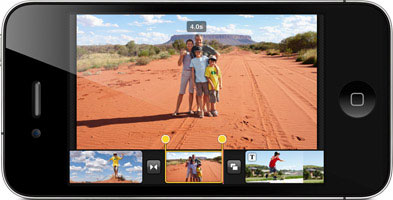
iPhone 4 features a new 5 megapixel autofocus camera with a 5x digital zoom, a backside illuminated sensor and built-in LED flash that allows you to take amazing pictures even in low light and dark environments. iPhone 4 lets you record and edit incredible HD video and the popular tap to focus feature now works while recording video. You can use the iPhone 4‘s LED flash for both still photography and video recording. The new iMovie app for iPhone lets you combine movie clips, add dynamic transitions and themes and include photos and music, and users can buy it for just $4.99 through the App Store right on their phone.

iPhone 4 is the best mobile device ever for games and entertainment, with access to tens of thousands of games and entertainment apps on the revolutionary App Store. Every iPhone 4 has a built-in 3-axis gyro that when combined with the accelerometer provides 6-axis motion sensing such as up and down, side to side, forward and backward and pitch and roll, making it perfect for gaming. Developers can access the gyro using the new CoreMotion API to make games and other apps that go well beyond what other mobile devices offer.

iPhone 4 comes with iOS 4, the newest version of the world’s most advanced mobile operating system. With over 100 new features, it includes Multitasking, Folders, enhanced Mail, deeper Enterprise support and Apple’s new iAd mobile advertising platform. With Multitasking, users can now instantly switch between any of their apps while preserving battery life. With Folders, users can easily organize their apps into collections by simply dragging one app on top of another. A folder is automatically created and named based on the category of apps selected. Users can change the name of any folder at any time. In addition, users can now customize their lock and home screens with an array of supplied wallpapers or with any of the photos on their phone.

The new iBooks app will be available for iPhone 4 as a free download from the App Store and includes Apple’s new iBookstore, the best way to browse, buy and read books on a mobile product. The iBooks app will sync your current place in a book, along with any bookmarks, highlights and notes you have created, between copies of the same book on your iPad, iPhone or iPod touch. iBooks users can also now read and store PDFs right in iBooks. There are now over 60,000 books available in the iBookstore, and users have downloaded over five million books in the first two months.

More than five billion apps have been downloaded from the revolutionary App Store and more than 225,000 apps are available to consumers in 90 countries. Almost 100 million iPhone and iPod touch users around the world can choose from an incredible range of apps in 20 categories, including games, business, news, sports, health, reference and travel.

iPhone 4 delivers an amazing seven hours of talk time on 3G networks, up to 10 hours of web browsing on Wi-Fi and up to six hours on 3G, and up to 10 hours of video playback and up to 40 hours of audio playback. iPhone 4 is powered by Apple’s new A4 processor that provides exceptional processor and graphic performance along with long battery life. iPhone 4 features a second microphone and advanced software to suppress unwanted background noise for improved call quality when in loud places. iPhone 4 also offers 802.11n Wi-Fi networking and adds quad-band HSUPA to provide 7.2Mbps downlink and 5.8Mbps uplink capability.

Pricing & Availability
iPhone 4 comes in either black or white and will be available in the US for a suggested retail price of $199 (US) for the 16GB model and $299 (US) for the 32GB model in both Apple and AT&T’s retail and online stores, Best Buy and Wal-Mart stores. iPhone 4 will be available in the US, France, Germany, Japan and the UK on June 24 and customers can pre-order their iPhone 4 beginning Tuesday, June 15 from the Apple Online Store or reserve an iPhone 4 to pick up at an Apple Retail Store. iMovie for iPhone will be available on the App Store for just $4.99 (US).

Also on June 24, a new iPhone 3GS 8GB model will be available for just $99 (US). iOS 4 software will be available on June 21 as a free software update via iTunes 9.2 or later for iPhone and iPod touch customers.

iPhone 4 will roll out worldwide to 88 countries by the end of September. iPhone 4 will be available by the end of July in Australia, Austria, Belgium, Canada, Denmark, Finland, Hong Kong, Ireland, Italy, Luxembourg, Netherlands, Norway, New Zealand, Singapore, South Korea, Spain, Sweden and Switzerland.

http://www.apple.com/iphone/