Showing posts with label iPad. Show all posts

Sep 7, 2010

iOS 4.1 on Sept 9th, 4.2 in November

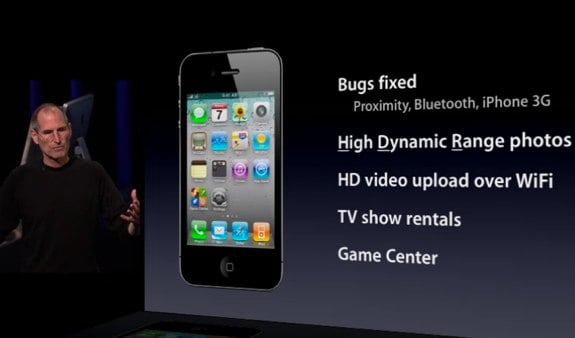
iOS 4.1 was, as expected, announced during today’s annual September keynote, and includes a slew of bug fixes, and a few new features.

iOS 4.1 includes bug fixes for proximity awareness, Bluetooth, and performance on the iPhone 3G. The iPhone will now be able to take High Dynamic Range photos, upload HD video over Wi-Fi, and rent television shows on the go. Also making its debut is the Game Center, which is all about social gaming on iOS devices.

Using High Dynamic Range (HDR), the iPhone takes three photos: one at normal exposure, one under exposed, and one over exposed. iOS 4 then combines the three photos using “advanced algorithms” to create a single high-definition photograph. Both the normal exposure picture and the HDR picture are kept in the photos app on the iPhone, making it easy to choose one or the other. The demos look amazing; the HDR photos bring out features in the background that you couldn’t see in the normal exposure.

The Game Center will be a very interesting addition to iOS. There will be both features built into the operating system, and a standalone app. You’ll be able to play interactively with friends, or be auto-matched with other players. You’ll be able to compare scores, and see what your friends have been up to. Game Center brings natively to iOS what several developers have been doing on their own.


Also announced to be coming out this November is iOS 4.2. iOS 4.2 will bring all of the features of iOS 4.1, finally, to the iPad, and presumably unify the platform. The biggest addition to the iPad looks like it will be wireless printing. Being able to print directly from Pages or Mail will be a huge benefit to people who still need to be able to show things on paper.

Multitasking looks slick on the iPad as well, smooth animation, and super fast switching between apps. When Steve Jobs demoed opening a link in Mail and switching to Safari, the transition happened so fast it made me wonder about the apps that have built-in browsers. Will apps still need built-in browsers if switching to Safari is that fast?

Overall both updates look solid, and while I’m happy to be getting 4.1 on my iPod touch, I’m really looking forward to 4.2 on the iPad.

theappleblog.com

Apr 23, 2010

How to make your own iPad micro SIM

Despite the 3G version of the iPad being sold unlocked, it requires a whole new type of SIM card, or does it? That's right, we've been trimming away the mystery of the new micro-SIM.

At first glance, the electronic contact area is no different to that of a conventional SIM, you know, the type that's small enough to fit into a tiny phone never mind the hulking iPad.

As it turns out traditional SIMs measure 15 x 25mm and have that angled corner. The new micro-SIM is officially 12 x 15mm. That's effectively the size of just the normal SIM contact area.

Apple was just wanting to be clever or it just wanted everyone to be forced to buy new SIMs, either way it's a touch annoying, but with our mighty scissors we can cut them down to size and so can you. SIMples.

How to do it:

Future Publishing Limited provides the information for this project in good faith and makes no representations as to its completeness or accuracy. Individuals carrying out the instructions in this project do so at their own risk.

1. Here's a traditional SIM and its measurements, the only working area is the metal contacts.

2. This is the same SIM with the micro-SIM specifications overlaid. You can use this to trim yours down to size.

3. Here we are cutting our SIM down to size...

4. ...and now it's ready to activate in our shiny new iPad.

techradar.com (well, nice trick, good one..)


Apr 5, 2010

First iPad Jailbreak Demoed


Here comes the iPad jailbreak! iPhone Dev Team member musclenerd has released a video showing a rough demo of a jailbreak that's given him access to the iPad's software inner workings. While it's more of a developmental hack than a full-functioning, consumer-grade jailbreak at this point, it's only matter of time before iPad amateurs will be able to unleash the tweak on their own devices. And, of course, that means third-party application installers like Cydia are but a touch or two away.


How does the jailbreak work? The details are unclear. However, since the jailbreak is allegedly based off of a jailbreak for the iPhone called, "Spirit," written by a developer called Comex, it's safe to say that the methods used will be similar when the consumer-grade jailbreak is unleashed.

To jailbreak a phone using Spirit, one only has to surf on over to a particular Web site using the device's internal Safari browser. Grant the site permission to jailbreak the phone, and it'll take advantage of a bug found in the browser to gain root access to the device.

Since the identical bug can be found on both the iPhone OS 3.1.3 the iPad OS 3.2, it stands that this will likely be the easiest way to jailbreak either device—until Applel patches the hole with a security update (as it's done in the past with browser-based jailbreaks).

pcmag.com

Mar 31, 2010

Fake iPad Spotted in China

This iPad uses atom processor and the price is about below $ 400


This one uses Windows 7


and this one can be yours for just $290

Mar 23, 2010

Jailbreak iPad OS 3.2


The developer behind Greenpois0n – p0sixninja has just posted a screenshot of his jailbreaking tool for iPhone and iPod touch which is said to now bring support for jailbreaking iPad. For those of you who don’t know, p0sixninja is a member of Chronic Dev Team and they have now tweeted about accepting donations to help them get an iPad in order to help them jailbreak it.

Mar 10, 2010

iPad


Apple's development of a tablet computer began with the Newton MessagePad 100, first introduced in 1993. This effort led to the creation of the ARM6 processor core with Acorn Computers. Apple also developed a prototype PowerBook Duo-based tablet computer, the PenLite, but did not sell it to avoid hurting MessagePad sales. Apple released several more Newton-based PDAs, and discontinued the last in the line, the MessagePad 2100, in 1998.

By late 2009, the iPad's release had been rumored for several months with iSlate and iTablet among speculated names.

The iPad is a tablet computer developed by Apple Inc. Announced on January 27, 2010, it is designed to create a new device category between a smartphone and a laptop computer. Similar in functionality to a larger and more powerful iPhone or iPod touch, it runs a modified version of the same operating system (iPhone OS). Its applications have been redesigned to take advantage of the larger screen with added functionality similar to their Mac OSX counterparts.

The iPad has a larger 9.7-inch (25 cm) LED backlit multi-touch display with a pixel resolution of 1024x768, 16 to 64 gigabytes (GB) of flash memory, a 1-gigahertz (GHz) Apple A4 processor, Bluetooth 2.1, and a 30-pin dock connector to sync with iTunes and connect wired accessories.

Two models have been announced: one with 802.11n Wi-Fi and one with 802.11n Wi-Fi and 3G (which can connect to HSDPA cellular networks), and Assisted GPS. Both models may be purchased with three different memory capacities.

Many people upset because iPad dont have flash on it. Steve Jobs said that flash is to buggy. But, I guess I know why Steve Jobs didnt want to put flash on iPad, recently, I just found something better than flash, HTML 5 + CSS 3, you all must see it. Its way 1000x better than flash. Maybe this is the reason why Steve Jobs didnt want flash on iPad.