Showing posts with label iPhone. Show all posts

Sep 7, 2010

iOS 4.1 on Sept 9th, 4.2 in November

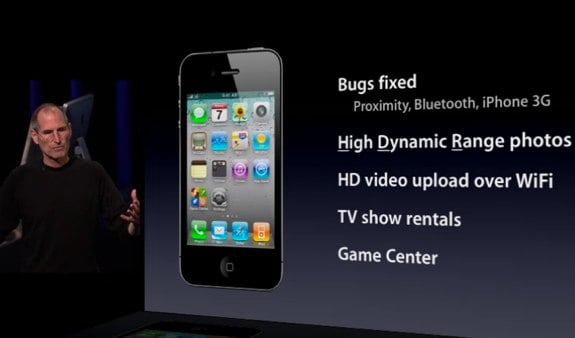
iOS 4.1 was, as expected, announced during today’s annual September keynote, and includes a slew of bug fixes, and a few new features.

iOS 4.1 includes bug fixes for proximity awareness, Bluetooth, and performance on the iPhone 3G. The iPhone will now be able to take High Dynamic Range photos, upload HD video over Wi-Fi, and rent television shows on the go. Also making its debut is the Game Center, which is all about social gaming on iOS devices.

Using High Dynamic Range (HDR), the iPhone takes three photos: one at normal exposure, one under exposed, and one over exposed. iOS 4 then combines the three photos using “advanced algorithms” to create a single high-definition photograph. Both the normal exposure picture and the HDR picture are kept in the photos app on the iPhone, making it easy to choose one or the other. The demos look amazing; the HDR photos bring out features in the background that you couldn’t see in the normal exposure.

The Game Center will be a very interesting addition to iOS. There will be both features built into the operating system, and a standalone app. You’ll be able to play interactively with friends, or be auto-matched with other players. You’ll be able to compare scores, and see what your friends have been up to. Game Center brings natively to iOS what several developers have been doing on their own.


Also announced to be coming out this November is iOS 4.2. iOS 4.2 will bring all of the features of iOS 4.1, finally, to the iPad, and presumably unify the platform. The biggest addition to the iPad looks like it will be wireless printing. Being able to print directly from Pages or Mail will be a huge benefit to people who still need to be able to show things on paper.

Multitasking looks slick on the iPad as well, smooth animation, and super fast switching between apps. When Steve Jobs demoed opening a link in Mail and switching to Safari, the transition happened so fast it made me wonder about the apps that have built-in browsers. Will apps still need built-in browsers if switching to Safari is that fast?

Overall both updates look solid, and while I’m happy to be getting 4.1 on my iPod touch, I’m really looking forward to 4.2 on the iPad.

theappleblog.com

Jul 15, 2010

Apple Releases iOS 4.1 Beta to Developers

Apple has announced to developers that iOS SDK and iOS 4.1 beta are now available from the iPhone Dev Center.

Apps built with iOS SDK 4.1 beta should only be tested on devices running iOS 4.1. Make sure to read the Xcode 3.2.4 Readme and the iOS SDK 4.1 beta Release Notes before installing and downloading these new releases.

The SDK build number is 10M2304 and the firmware build number is 8B5080c.

Hopefully some of the false reception readings and proximity sensor issues will be resolved in this update. Developers please let us know your experiences in the comments...

Changes:
1. Signal Bars seem to be fixed and are taller
2. New Baseband (02.07.01)
3. Game Center is back with new look (see screenshot)
4. Camera Switch and Flash buttons reposition in landscape mode (see screenshot)
5. You can now choose to add Favorite as voice or FaceTime.
6. Spell Check can be turned off in Settings

Jul 14, 2010

Planetbeing Demos iPhone 4 Unlock

Why Apple—and not its customers—should fix the iPhone 4

In our reporting and a video yesterday, we made the point that the signal drop that iPhone 4 customers have observed when they hold their phones the "wrong" way is real—and we've called on Apple to do something about it. In an earlier statement, the company noted that attenuated performance is a "fact of life" for every wireless phone. Apple suggested owners mitigate the problem by holding the phone differently or purchasing a case. But those solutions put the onus on consumers and skirt Apple's obligation to offer a product that works consistently and reliably out of the box.

We think it's the company's responsibility to provide the fix—at no extra cost to consumers.

Our tests, conducted in our labs using controlled signals, confirm growing anecdotal indications that the iPhone 4's problems are anything but illusory. Our tests found that when your finger or hand touches a spot on the phone's lower left side—an easy thing to do—the signal can significantly degrade enough to cause you to lose your connection altogether if you're in an area with a weak signal. We tested several other AT&T phones the same way, including the iPhone 3G S and the Palm Pre. None of those phones had the significant signal-loss problems of the iPhone 4.

Ironically, aside from these reception glitches, our other tests placed the iPhone 4 atop the latest Ratings of smart phones. But we did not feel comfortable listing a phone with such a problem as "recommended," and therefore have withheld that tag.

Our stopgap fix for the issues of applying duct tape to the phone—while inexpensive and easily done—obviously isn't meant to be a permanent solution. The real fix, we believe, should come from Apple. The company has said it will issue a software update that will make the phone's bars more accurate, though it remains to be seen if fixing metering inaccuracies will address the problem of dropped calls. The company will also provide a full refund to users who return their iPhone within 30 days.

But for those who prefer to keep their iPhone, we encourage Apple to step forward soon with a remedy that fixes the confirmed antenna issue, and not one that requires additional consumer expense.

source

Jul 11, 2010

Geohot Jailbreaks the iPhone 4 ( not anymore )

Geohot has announced that he has jailbroken the iPhone 4.

As far as a release goes, it probably won't happen from me. limera1n is little more than a raindrop on a website; it was never mentioned by me previous to this post. pwned4life is a complete invention of some blogger in a basement somewhere. When I said pwned for life, I was referring to the original iPhone, 3G, and Touch; which of course are, by the aptly named PwnageTool. Again, please don't ask for release dates. Every person that does makes me want to release a little bit less.

Considering that there already is a userland jailbreak coming for all 4.0 devices; Geohot may save his exploit for the future.

Update 1 :
Geohot Withdraws from iPhone Jailbreak and Unlock Scene

Geohot has also now shut down his Twitter account which has 113,761 followers. Visiting the account now says, "This person has protected their tweets" and no past tweets are viewable to the public.

Here are his last messages:

"I was just having fun but some people had to take this all way too seriously. it's just a phone, and it isn't much fun anymore.

my bio isn't "iPhone hacker" it was just something i did occasionally when i was bored. seriously, i think many of you care way more than me

it was a cool ride, and i've learned a lot about a lot. perhaps one of these days i'll do a more formal goodbye."

Jul 7, 2010

Understanding iOS 4 Backgrounding and Delegate Messaging

The World Before Multitasking

The first thing that I learned from this is that applicationDidBecomeActive: is being called right after application:didFinishLaunchingWithOptions:. So even before 4.0 it would have been smart to put there any kind of code that you want executed whenever the app becomes active, be it after app start or upon rejecting a phone call.

Not shown on this diagram is the situation that your app is eating up all the system memory and ignores both the level 1 and level 2 memory warnings. In that case the OS will also terminate your app without totally unscrupulous.

The mechanism with WillResignActive and DidBecomeActive is sort of the Backgrounding Lite that has always been there. This occurs whenever some other thing is displayed in front of your app. This could be the UI to accept a phone call or something as benign as the synching screen.

Multitasking ON

Adding multitasking to this flow chart makes it about twice as complex. I probably spent an hour trying to fit it all together with no crossing lines. Another thing that I noticed while doing this is that applicationWillResignActive: is the only delegate method that I could not optimize into a single box, because one use is to show that the app has been interrupted, the other is to the path into the background.


An app built with 3.2 will still go through a short background stage where applicationDidEnterBackground: is called. but then it will be terminated as usual. If the same app is built against a 4.x SDK then it will not go straight from background to being terminated. Instead it will stick around and so will be the debugger. As soon as you tap the app icon again or choose it from the app switcher it is first informed that applicationWillEnterForeground and then applicationDidBecomeActive.

An app that is suspended but still in RAM might be terminated by the OS if memory runs low. But after entering the background there is no longer any delegate method being called, instead the app will receive a KILL signal. This occurs also if the user long-presses the app icon in app switcher and then removes the app from there with the removal button.

Accepting a phone call no longer terminates your app but will send it into the appropriate background mode. Within the background box you see two purple states that the app can be in. All apps are suspended in RAM per default. You might want to slim down your memory footprint to make your app a less likely target for killing if the system runs low on memory.

Only apps that actually require background processing continue to be executing. This requirement is either set in info.plist or by telling the OS that you have a task to complete, like for example a file upload.

The following kinds of activities get to run in true multi tasking behind the foreground app with lesser CPU priority.

  • playing music: “App plays audio”
  • geo location: “App registers for location updates”
  • VOIP: “App provides Voice over IP services”

If your app does one of these things then adding the key to info.plist is all it takes. But be aware that as soon as your app stops doing what it stated it would be doing the OS again will send it to sleep, only to be awakend by another gentle tap by the user.

In background mode you’re advised to stop updating the UI. Especially with OpenGL Apple is really strict. If you app as much as touches OpenGL while in background the app gets killed right away.

There are only two scenarios left where your app’s applicationWillTerminate: will actually be called: if it’s build with an SDK of less than version 4.0 or if you chose to opt out of backgrounding by adding the UIApplicationExitsOnSuspend key to your info.plist.

So, let’s ask the question we’ve been doing all this fuss for: Where should you now put your code to initialize, update or save changes? applicationWillTerminate not being called in the majority of cases makes it a rather bad candidate to save user defaults or data.

Looking at the chart I see applicationDidEnterBackground as the ideal candidate delegate method for saving state. This is also the last method to be called before a regular 4.0 app gets put to sleep and before a possible kill.

For updating data from the web the case is not as clear. You would not want to reload every time the user comes back to your app. Possible applicationDidBecomeActive: is a good place, provided that you only reload data if sufficient time has passed to be able to assume that something new is available.

Only the first loading of data can stay in application:didFinishLaunchingWithOptions: since every call applicationDidBecomeActive: most likely has the data already loaded previously.

Conclusion

Adding fast app switching and multitasking support is quite easy since for the most part you don’t need to do anything. But you WILL have to review the contents of your app delegate methods to see which code has to be moved into one of the other delegate methods now. Clean out applicationWillTerminate: and have a close look at application:didFinishLaunchingWithOptions: to check if you have something in there that needs to be done every time the app becomes active.

These charts come from some experimentation that I did and what I remembered from the WWDC 2010 session videos on multitasking. Potentially there are mistakes or more surprises hidden in there. Please let me know if you find any.

Here’s the chart in PDF format in case you want to print it out and frame it.

source
Jun 18, 2010

iPhone 4 Confirmed to Have 512MB of RAM (Twice the iPad and 3GS)

Since the launch of the original iPhone, Apple has made efforts to hide some of the actual tech specs of the device from consumers. Apple has never advertised or even published the processor speed or amount of RAM found in the iPhone. Arguably, Apple is trying to shield customers from these technical distractions and instead trying to focus on overall functionality.

More technically inclined customers, however, still love to know what they have to work with. The original iPhone and iPhone 3G contained 128MB of RAM, while the iPhone 3GS was boosted to 256MB of RAM. Similarly, the iPad contains 256MB of RAM. This discrepancy offers a technical explanation why Apple is not supporting iOS 4 features such as multi-tasking on the original and 3G iPhone -- there simply isn't enough RAM.

We have since heard that the upcoming iPhone 4's RAM has again been upgraded. This will bring it to a total of 512MB of RAM, twice as much as the 3GS and iPad. This number actually contradicts tear down photos of a prototype iPhone 4 that was leaked to the internet. An analysis of that prototype device showed it only carried 256MB of RAM. The 512MB figure, however, does agree with a Digitimes report from May 17th that confirmed a 960x640 screen resolution, thinner display, and indeed 512MB of RAM. We had heard that Apple confirmed this 512MB figure during one of the WWDC sessions last week, and have now verified this. The session it was revealed in is now available (Session 147, Advanced Performance Optimization on iPhone OS, pt 2) for registered Apple developers.

The added RAM should help overall performance and multi-tasking on the new iPhone 4. It could also explain why the iMovie App that Apple introduced at WWDC will only run on the iPhone 4. Apple has said iMovie will only run on the iPhone 4 and not the 3GS or even the iPad. It seems conceivable that it actually makes use of the extra RAM offered by the iPhone 4.

macrumors.com

Jun 8, 2010

iPhone 4


Apple today official unveiled the iPhone 4 featuring FaceTime, which makes the dream of video calling a reality, and Apple’s stunning new Retina display, the highest resolution display ever built into a phone, resulting in super crisp text, images and video.

In addition, iPhone 4 features a 5 megapixel camera with LED flash, HD video recording, Apple’s A4 processor, a 3-axis gyro and up to 40 percent longer talk time—in a beautiful all-new design of glass and stainless steel that is the thinnest smartphone in the world. iPhone 4 comes with iOS 4, the newest version of the world’s most advanced mobile operating system, which includes over 100 new features and 1500 new APIs for developers. iOS 4 features Multitasking, Folders, enhanced Mail, deeper Enterprise support and Apple’s new iAd mobile advertising platform. iPhone 4 will be available in the US, UK, France, Germany and Japan on June 24, starting in the US at just $199 for qualified buyers with a two year contract.

“iPhone 4 is the biggest leap since the original iPhone,” said Steve Jobs, Apple’s CEO. “FaceTime video calling sets a new standard for mobile communication, and our new Retina display is the highest resolution display ever in a phone, with text looking like it does on a fine printed page. We have been dreaming about both of these breakthroughs for decades.”

FaceTime is as mobile as your phone, so you can see your loved ones and friends anywhere there is Wi-Fi. Using FaceTime is as easy as making a regular voice call, with no set-up required, and you can instantly switch to the rear camera to show others what you are seeing with just a tap.

Apple’s stunning 3.5 inch Retina display has 960 x 640 pixels—four times as many pixels as the iPhone 3GS and 78 percent of the pixels on an iPad. The resulting 326 pixels per inch is so dense that the human eye is unable to distinguish individual pixels when the phone is held at a normal distance, making text, images and video look sharper, smoother and more realistic than ever before on an electronic display.

iPhone 4 is the thinnest smartphone ever—9.3 millimeters—with an all-new design and build quality like no other mobile device. The front and back are made of aluminosilcate glass, chemically strengthened to be 30 times harder than plastic, more scratch resistant and more durable than ever. The front and back glass have an oil-resistant coating that helps keep it clean, and encircling iPhone 4 is a highly finished stainless steel band made of a custom alloy that is forged to be five times stronger than standard steel.

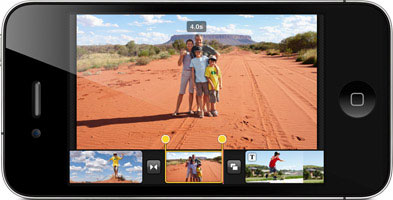
iPhone 4 features a new 5 megapixel autofocus camera with a 5x digital zoom, a backside illuminated sensor and built-in LED flash that allows you to take amazing pictures even in low light and dark environments. iPhone 4 lets you record and edit incredible HD video and the popular tap to focus feature now works while recording video. You can use the iPhone 4‘s LED flash for both still photography and video recording. The new iMovie app for iPhone lets you combine movie clips, add dynamic transitions and themes and include photos and music, and users can buy it for just $4.99 through the App Store right on their phone.

iPhone 4 is the best mobile device ever for games and entertainment, with access to tens of thousands of games and entertainment apps on the revolutionary App Store. Every iPhone 4 has a built-in 3-axis gyro that when combined with the accelerometer provides 6-axis motion sensing such as up and down, side to side, forward and backward and pitch and roll, making it perfect for gaming. Developers can access the gyro using the new CoreMotion API to make games and other apps that go well beyond what other mobile devices offer.

iPhone 4 comes with iOS 4, the newest version of the world’s most advanced mobile operating system. With over 100 new features, it includes Multitasking, Folders, enhanced Mail, deeper Enterprise support and Apple’s new iAd mobile advertising platform. With Multitasking, users can now instantly switch between any of their apps while preserving battery life. With Folders, users can easily organize their apps into collections by simply dragging one app on top of another. A folder is automatically created and named based on the category of apps selected. Users can change the name of any folder at any time. In addition, users can now customize their lock and home screens with an array of supplied wallpapers or with any of the photos on their phone.

The new iBooks app will be available for iPhone 4 as a free download from the App Store and includes Apple’s new iBookstore, the best way to browse, buy and read books on a mobile product. The iBooks app will sync your current place in a book, along with any bookmarks, highlights and notes you have created, between copies of the same book on your iPad, iPhone or iPod touch. iBooks users can also now read and store PDFs right in iBooks. There are now over 60,000 books available in the iBookstore, and users have downloaded over five million books in the first two months.

More than five billion apps have been downloaded from the revolutionary App Store and more than 225,000 apps are available to consumers in 90 countries. Almost 100 million iPhone and iPod touch users around the world can choose from an incredible range of apps in 20 categories, including games, business, news, sports, health, reference and travel.

iPhone 4 delivers an amazing seven hours of talk time on 3G networks, up to 10 hours of web browsing on Wi-Fi and up to six hours on 3G, and up to 10 hours of video playback and up to 40 hours of audio playback. iPhone 4 is powered by Apple’s new A4 processor that provides exceptional processor and graphic performance along with long battery life. iPhone 4 features a second microphone and advanced software to suppress unwanted background noise for improved call quality when in loud places. iPhone 4 also offers 802.11n Wi-Fi networking and adds quad-band HSUPA to provide 7.2Mbps downlink and 5.8Mbps uplink capability.

Pricing & Availability
iPhone 4 comes in either black or white and will be available in the US for a suggested retail price of $199 (US) for the 16GB model and $299 (US) for the 32GB model in both Apple and AT&T’s retail and online stores, Best Buy and Wal-Mart stores. iPhone 4 will be available in the US, France, Germany, Japan and the UK on June 24 and customers can pre-order their iPhone 4 beginning Tuesday, June 15 from the Apple Online Store or reserve an iPhone 4 to pick up at an Apple Retail Store. iMovie for iPhone will be available on the App Store for just $4.99 (US).

Also on June 24, a new iPhone 3GS 8GB model will be available for just $99 (US). iOS 4 software will be available on June 21 as a free software update via iTunes 9.2 or later for iPhone and iPod touch customers.

iPhone 4 will roll out worldwide to 88 countries by the end of September. iPhone 4 will be available by the end of July in Australia, Austria, Belgium, Canada, Denmark, Finland, Hong Kong, Ireland, Italy, Luxembourg, Netherlands, Norway, New Zealand, Singapore, South Korea, Spain, Sweden and Switzerland.

http://www.apple.com/iphone/

May 27, 2010

Apple Has a Backup Design for the New iPhone?

Apple has a backup design more similar to the iPhone 3GS in case of production problems with the new design leaked by Gizmodo, according to DigiTimes.

On a side note, Apple initiated the iPhone 4G project at the end of 2008. According to our sources, Apple actually has another product codenamed N91 for the project, which offers less change from previous iPhones compared with the N90. It's a parallel product to back up the N90 in case there are major delays due to significant modifications in casing, display resolution, digital camera support and so forth.

In regards to AMOLED touch panels, DigiTimes notes that Apple did speak with Samsung Mobile Display about the possibility; however, production capacity was a big issue.

SMD only has the capability to fulfill 50-60% of iPhone orders at the moment even it dedicated all AMOLED capacity to Apple. Of course, cost is always a concern. AMOLED panels cost US$34-38. TN panels cost less than US$10 and IPS panels around US$20.

Finally the report indicates that the Verizon compatible iPhone is still in early testing and won't be available for some time.

Pegatron will indeed assemble an iPhone, but the manufacturing cooperation is still at the EVT (engineer verification test) stage. There are two more stages - DVT (design verification test) and PVT (process verification test) - before mass production. Though there were reports that shipments for this particular device will begin in the second half, we believe 2011 is more likely.

iclarified.com

May 24, 2010

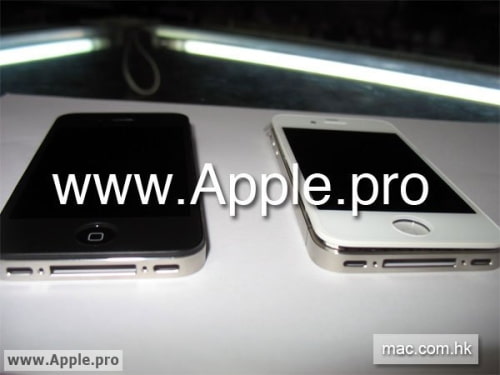
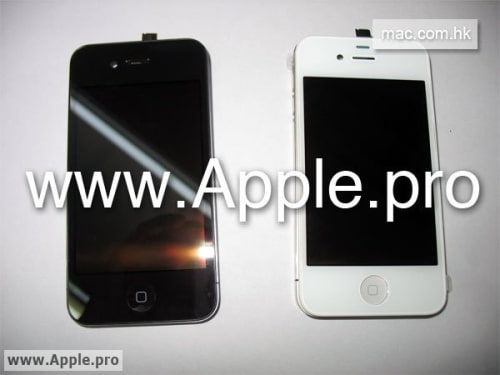
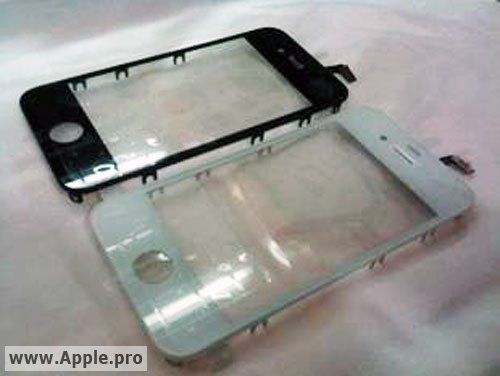
White iPhone HD / iPhone 4G case spotted


Chinese site Apple.pro has a few pictures of what it says is the white iPhone 4G/HD almost fully assembled. Apple is going to release two versions of the phone later this year. Is it true ?

May 7, 2010

New Features in iPhone OS 4 Beta 3


This week saw the release of a new beta for the upcoming iPhone OS major release, version 4.0. Beta 3 brought a lot of bug fixes and stability improvements, but it also brings some more noticeable changes the user experience of everyone’s favorite smartphone device.

File Sharing

A new menu interface in the Apps tab of your iPhone when it’s connected to iTunes promises to allow you to move files from your computer to your iPhone, and to specific apps in particular.

Can’t wait to see this feature implemented device-wide. It’ll make it so much simpler to use apps like Documents to Go and, hopefully, the entire iWorks suite from Apple itself. Let’s hope all file types are supported, too, so that certain apps will be able to turn your iPhone into a true flash drive, finally.

Closing Open Apps

The new multitasking interface is great for switching between apps, but wasn’t all that great for killing open ones, since you had to hold them individually until the red minus sign appeared, and then do the same again for the next. In this new update, each app that’s open now gets a minus sign when you perform the icon hold once, so you can then go through and kill them all quickly in one pass. It’s a huge improvement in terms of user experience, and one that my tired digits greatly appreciate.

Screen Orientation Lock

Lying in bed, trying to browse the web, and having to hold the iPhone and your head at just the right angle to prevent it from switching to landscape mode. Now that’s incredibly annoying. I’m sure you’ll agree if you’ve ever had to do it, or anything that involved trying to prevent the iPhone’s auto-orientation adjustment from happening.

A new button, located in the app switcher bar, fixes all that. It locks the iPhone in portrait-only mode, device-wide. No option to lock it in landscape mode, but that wouldn’t really work on the iPhone, which lacks landscape options for the home screen.

iPhone OS 4.0 was exciting to begin with, but to see that Apple’s actively interested in adding further refinements and improvements at this late stage is even better. Let’s hope these new features make the cut and see full implementation in the final release.

theappleblog.com

Apr 30, 2010

How to add more than 11 pages on Springboard without jailbreaking it (iPhone/iTouch)


1. Make the first page & last page full of applications/games
2. Put Voice Memo application on last page at the bottom right corner
3. Open page 10 ( page before the last page ) and move one of applications to the last page ( page 11)
4. Your Voice Memo application will dissappear, don't worry..
5. Just restart your iPhone / iTouch
6. Done! You have 12 pages on your iPhone / iTouch
7. Just follow my instruction above to add more pages ( 13 pages, 14 pages, 15 pages, 16 pages, 17 pages .... )

Apr 27, 2010

Wi-Fi Sync: App Wirelessly Syncs Your iPhone With iTunes [Will Apple Approve?]

Wi-Fi Sync is a new iPhone application which lets you wirelessly sync your device with iTunes on your computer.

According to developer Greg Hughes, "I'm hoping to submit to the App Store shortly."

Hopefully, Apple will approve and it will be available soon.

Apr 20, 2010

Apple Demands iPhone 4G Prototype Be Returned


Here is their reply...
-----
Bruce, thanks.
Here's Jason Chen, who has the iPhone. And here's his address. You two should coordinate a time.

[redacted]

Happy to have you pick this thing up. Was burning a hole in our pockets. Just so you know, we didn't know this was stolen [as they might have claimed. meaning, real and truly from Apple. It was found, and to be of unproven origin] when we bought it. Now that we definitely know it's not some knockoff, and it really is Apple's, I'm happy to see it returned to its rightful owner.

P.S. I hope you take it easy on the kid who lost it. I don't think he loves anything more than Apple.

iPhone 4G Prototype


Images have just leaked of what might be an iPhone 4G prototype found on the floor of a San Jose bar inside an iPhone 3G case.

Apple considers the iPhone 4G prototype being showcased around the web to be stolen property, not a lost device, according to Daring Fireball. The new owner of the device said it was found on the floor of a San Jose bar inside an iPhone 3G case; however, this information can't really be confirmed. In Gizmodo's hands-on report they note that Gruber said the device was reported lost and Apple wants it back.

What's new:
• Front-facing video chat camera
• Improved regular back-camera (the lens is quite noticeably larger than the iPhone 3GS)
• Camera flash
• Micro-SIM instead of standard SIM (like the iPad)
• Improved display. It's unclear if it's the 960x460 display thrown around before—it certainly looks like it, with the "Connect to iTunes" screen displaying much higher resolution than on a 3GS.
• What looks to be a secondary mic for noise cancellation, at the top, next to the headphone jack
• Split buttons for volume
• Power, mute, and volume buttons are all metallic

What's changed:
• The back is entirely flat, made of either glass (more likely) or ceramic or shiny plastic in order for the cell signal to poke through. Tapping on the back makes a more hollow and higher pitched sound compared to tapping on the glass on the front/screen, but that could just be the orientation of components inside making for a different sound
• An aluminum border going completely around the outside
• Slightly smaller screen than the 3GS (but seemingly higher resolution)
• Everything is more squared off
• 3 grams heavier
• 16% Larger battery
• Internals components are shrunken, miniaturized and reduced to make room for the larger battery

*Update: It seems this device has been spotted before. According to @TUDream a chinese tweeter uploaded similar photos some time ago.


*Update x2: Appleferas is saying the images are a Japanese clone.

*Update x3: Engadget is now declaring these images the real deal and provides some evidence to back this up.

*Update x4: Appleferas now says their source was faking about it being fake.

*Update x5: John Gruber has heard that Apple really wants this device back!

*Update x6: Gizmodo has got the device in hand and declares it the real deal!


Apr 11, 2010

Multi-Tasking Can Be Easily Enabled on the iPhone 3G

Multi-tasking can be easily enabled on the iPhone 3G by setting a flag in the capabilities plist, according to a tweet by cdevwill.

"wow looks like multitasking can be enabled on the 3G if you just set multitasking=TRUE on the capabilities plist in SB (N82AP.plist)"

Well, this doesn't come as much of a surprise. Apple doesn't want multi-tasking to run less than optimally. Disabling it is most likely a choice made to keep the device from running slower. (and of course to sell more iphones...) <----- LOL!!! yup, I guess it's a good reason.. iPod, iPhone, iPhone 3G, iPhone 3GS, iPad, and then iBroke!!

iclarified.com

Twitter Buys Tweetie, Makes It Free!

Twitter has announced the acquisition of Tweetie which will be renamed Twitter for iPhone and made free!

-----
Twitter has been growing by leaps and bounds around the world. Mobile has always been a focus for us—starting with SMS which lead to the 140 character limit. People everywhere should be able to access Twitter without friction or confusion. Careful analysis of the Twitter user experience in the iTunes AppStore revealed massive room for improvement. People are looking for an app from Twitter, and they're not finding one. So, they get confused and give up. It's important that we optimize for user benefit and create an awesome experience.

We're thrilled to announce that we've entered into an agreement with Atebits (aka Loren Brichter) to acquire Tweetie, a leading iPhone Twitter client. Tweetie will be renamed Twitter for iPhone and made free (currently $2.99) in the iTunes AppStore in the coming weeks. Loren will become a key member of our mobile team that is already having huge impact with device makers and service providers around the world. Loren's work won the 2009 Apple Design Award and we will eventually launch Twitter for iPad with his help.

As we work to provide the best possible Twitter experience on all of the major mobile platforms, momentum will increase dramatically. Millions more active, engaged, mobile users means more opportunities for all of us. Developers, services, and publishers will be able to leverage the Twitter iPhone and iPad applications to create additional innovative tools and integrations for users. We'll have more specific information on this once Loren is officially on board. In the meantime, please join us in welcoming Loren to the Twitter team.
-----

Twitter for iPhone is not yet available in the App Store. We'll keep checking and let you know when it is...

iclarified.com